A smartphone tripod stand is an essential accessory for mobile photographers and videographers, providing unparalleled stability to eliminate blurry photos and shaky videos, especially in low-light conditions or for long exposures. It transforms your smartphone into a more versatile camera, enabling advanced techniques like time-lapses, HDR, and focus stacking, which are difficult or impossible to achieve handheld. This tool elevates mobile content from casual snaps to professional-looking creations.
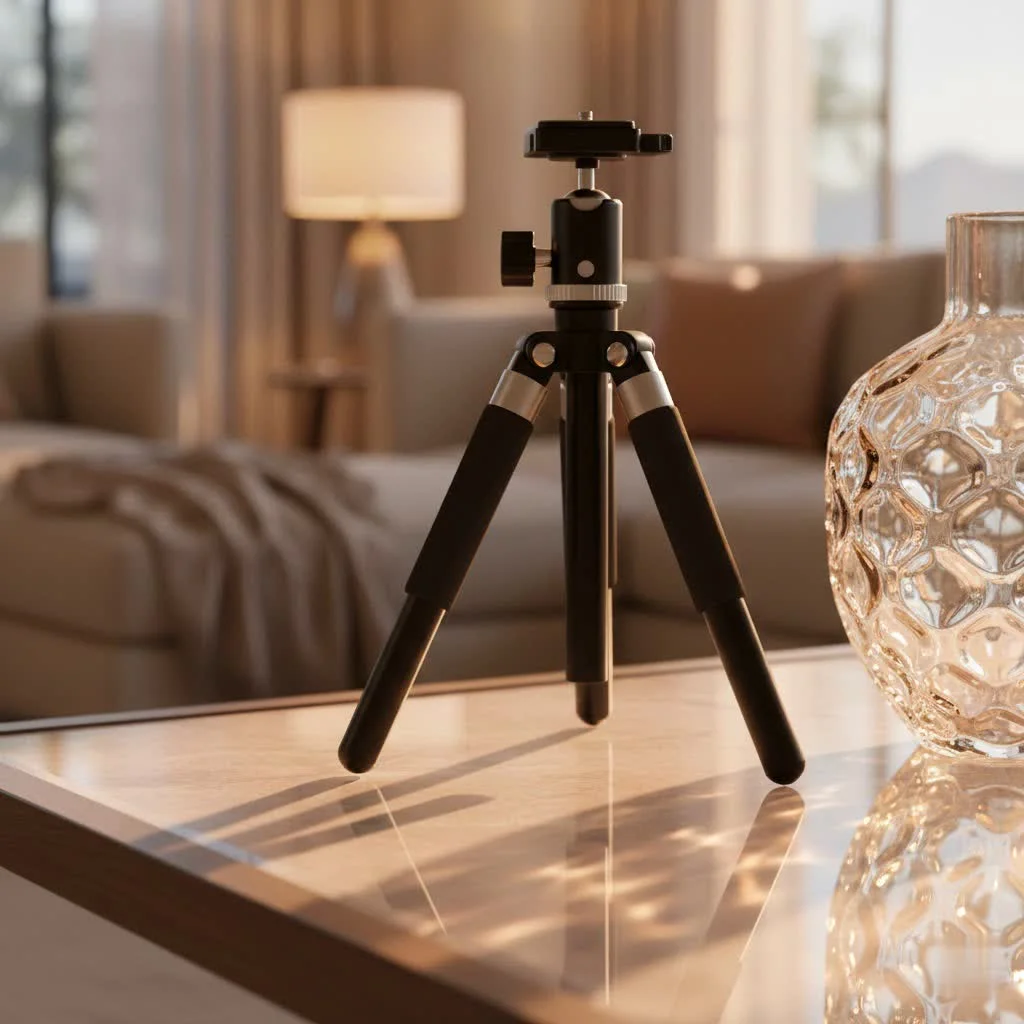
Why Every Smartphone Photographer Needs a Tripod Stand
Think of a smartphone tripod stand not as an optional accessory, but as a foundational piece of gear that empowers your creative vision. It’s about building a stable platform for truly exceptional imagery.
Unshakeable Stability for Crystal-Clear Shots
The most immediate and impactful benefit of a smartphone tripod stand is unparalleled stability. Even the steadiest hands can introduce micro-movements that lead to blurry photos and shaky videos. A tripod eliminates these jitters entirely, ensuring your images are razor-sharp and your footage is smooth as silk. This is especially crucial in challenging conditions like low light, where longer exposure times can result in motion blur without a stable base. Imagine capturing vibrant nightscapes, intricate light trails, or perfectly focused product shots – all virtually impossible to achieve handheld. Techniques like High Dynamic Range (HDR) and focus stacking thrive on absolute stillness, making a tripod indispensable for maximizing detail and dynamic range.
Unlock Creative Possibilities: Beyond the Basic Snapshot
Beyond mere stability, a smartphone tripod stand opens up a universe of creative possibilities. Have you ever wanted to shoot a mesmerizing time-lapse of a sunset, a bustling city street, or a blooming flower? A tripod is your gateway. It allows your phone to remain in precisely the same position for extended periods, capturing the subtle shifts that create stunning cinematic sequences. It also enables long-exposure photography, transforming moving water into silky smooth textures or turning car headlights into streaks of light. For content creators, a tripod offers hands-free operation, perfect for vlogging, live streaming, video calls, or recording yourself demonstrating a skill. You can step into the frame confidently, knowing your phone is perfectly positioned and steady.
Navigating the Options: Choosing the Right Smartphone Tripod Stand for You
The market is brimming with smartphone tripod stands, each designed with different uses and preferences in mind. Understanding the main types and key features will help you make an informed decision.
Types of Smartphone Tripod Stands
- Mini/Tabletop Tripods: These compact stands are a dream for portability. Often small enough to fit in a bag or even a pocket, they are perfect for desktop use, capturing low-angle shots, or quick setups on any flat surface. Some innovative designs, like the credit-card-sized Pocket Tripod, exemplify ultimate portability, ready when you need them without adding bulk.
- Flexible Tripods (e.g., GorillaPods): Known for their distinctive bendable legs, flexible tripods are incredibly versatile. They can grip onto railings, tree branches, or uneven surfaces, allowing for unique angles and perspectives that traditional tripods can’t achieve. They’re excellent for adventure photographers and vloggers who need adaptable mounting solutions.
- Full-Size Tripods: When height and robust stability are paramount, a full-size tripod stand is the way to go. These typically extend to eye-level or beyond, offering the same stability as traditional camera tripods but adapted for smartphones. They are ideal for more serious photography, outdoor shoots, and situations where you need significant elevation.
- Vlogging Kits & Specialty Stands: Designed with content creators in mind, these kits often integrate additional features like built-in LED lights, external microphones, or extendable selfie sticks. They provide an all-in-one solution for improving both video quality and audio, streamlining your setup for vlogging, streaming, or interviews.
Key Features to Look For
|
Our Picks for the Best Tripod Stand in 2026
As an Amazon Associate I earn from qualifying purchases.
|
||
| Num | Product | Action |
|---|---|---|
| 1 | EUCOS 62\" Phone Tripod, Tripod for iPhone & Selfie Stick with Remote, Extendable Cell Phone Stand & Ultimate Phone Holder, Solidest Phone Stand Compatible with iPhone/Android |

|
| 2 | TONEOF 68\" Magnetic Selfie Stick Tripod with Aluminum Strong Magnetic Holder for Magsafe, 360° Rotatable Travel Phone Tripod Stand with Metal Ring & Rechargeable Remote for iPhone/Android(Beige Gray) |
|
| 3 | CAMBOFOTO 74\"-Camera-Tripod, Professional Aluminum Tripod/Leg Stand Mirrorless Camera/DSLR/Cell Phone/Camcorder/GoPro, with Phone Holder and Travel Bag (Gunmetal Gray) Weight 2.8 lbs Load 8.8 lbs |
|
| 4 | 71” Phone Tripod & Selfie Stick, Portable All in One Extendable Cell Phone Tripod Stand, with Wireless Remote Control for iPhone/Samsung/Android/Camera |
|
| 5 | Laptop Tripod Stand – Adjustable Laptop Holder with Phone Mount - Heavy- Duty Alloy Tripod Stand with Tray - Height Adjustable 0.65–1.6m - Portable, Foldable, 15kg Load Capacity - Black |
|
| 6 | Amazon Basics 50-inch Lightweight Portable Camera Tripod Stand with Quick-Release Plate, Adjustable Height, Aluminum, for Travel Photography, Champagne |
|
| 7 | Projector Stand Tripod Adjustable, Laptop Height from 23.5 to 46.5 inches with Gooseneck Phone Holder, Floor for Office, Home, Stage, Studio, DJ Racks Holder Mount, 23.5inch-46.5inch |
|
| 8 | IFOOTAGE RB-A400 Round Base Light Stand Monopod, 79\" Tripod Monopod for Cameras, Lights, Webcam, Live Streaming, Vlogging, Payload 22LBS |
|
| 9 | SENSYNE 62\" Phone Tripod & Selfie Stick, Extendable Cell Phone Tripod Stand with Wireless Remote and Phone Holder, Compatible with iPhone Android Phone, Camera |
|
| 10 | 64” Tripod for Cell Phone & Camera, Phone Tripod with Remote and Phone Holder, Sturdy & Stable Height Adjustable Multi-Angle Shot Selfie Stick Tripod for Video Recording |
|
Choosing the best smartphone tripod stand involves more than just picking a type; it’s about evaluating the features that matter most for your specific needs.
- Mounting Mechanism: Most smartphone tripods use a universal spring-loaded clamp that securely holds your phone. Look for models with strong springs and padded grips to protect your device. Many also feature a standard ¼-20 threaded screw, allowing you to attach a dedicated phone holder or even mount other accessories. Newer iPhone users might also find MagSafe-compatible tripods for quick, magnetic attachment.
- Build Quality & Materials: The durability and weight of your tripod depend on its construction. Entry-level models often use plastic, which is lightweight but less durable. Opt for aluminum, carbon fiber, or high-grade engineered polymers for better stability and longevity. Soft, rubberized (TPU) contact zones are essential to prevent scratching your phone or case.
- Height & Adjustability: Consider the minimum and maximum height you’ll need. Does it have a ball head for fluid 360-degree rotation and quick angle changes, or a pan-tilt head for more precise horizontal and vertical adjustments, ideal for video? Look for secure leg locks that hold the desired height firmly.
- Portability: If you’re always on the go, the folded dimensions and weight are critical. A lightweight, compact tripod is more likely to be carried and used.
- Additional Features: Many smartphone tripod stands come with useful extras. A Bluetooth remote control is invaluable for triggering your camera remotely, eliminating camera shake from pressing the shutter button and making group photos effortless. Cold shoe mounts allow you to attach external accessories like LED lights or microphones, turning your smartphone into a more capable production tool.
Getting Started: How to Use Your Smartphone Tripod Effectively
Once you’ve chosen your smartphone tripod stand, getting the most out of it is about technique and thoughtful setup.
Securely Mounting Your Smartphone
First and foremost, ensure your smartphone is securely mounted. Most universal clamps are straightforward: simply expand the jaws and firmly seat your phone. If your tripod uses an adapter system, like some ultra-portable models, ensure you’ve selected the correct adapter size for your phone, with or without its case. The goal is a snug fit, free from wobbling. Always balance your phone’s center of mass within the tripod’s footprint; this prevents accidental tipping, especially when adjusting angles or on slightly uneven surfaces.
Mastering Angles and Composition
With your phone securely in place, you can now focus on composition. Adjust the tripod legs and head to achieve the perfect angle. Many tripods feature a ball head for quick, fluid movement in any direction, or a pan-tilt head for precise adjustments, particularly useful for horizontal and vertical alignment in video. Don’t be afraid to experiment with different heights and perspectives – from ground-level shots to high-angle views. Many tripods also offer markings, such as 5-degree increments, that help you repeat specific angles for consistent results across multiple shots.
Leveraging Accessories for Pro-Level Results
To truly improve your mobile content, integrate complementary accessories with your smartphone tripod stand. A Bluetooth remote is a major upgrade for selfies, group shots, and triggering long exposures without touching your phone. For improving video quality, consider attaching an external LED light to brighten your subject or a compact microphone to capture clearer audio. Many tripods and phone mounts feature a “cold shoe” mount or additional ¼-20 threads specifically for these accessories, transforming your mobile setup into a versatile mini studio.
Caring for Your Tripod: Maintenance Tips for Longevity
To ensure your smartphone tripod stand lasts for years, a little care goes a long way. Regularly wipe down the legs and joints with a dry or slightly damp microfiber cloth to remove dust and grit, which can hinder smooth operation. Avoid using harsh chemical cleaners or oils. When storing your tripod, ensure it’s dry and, if possible, lay it flat or store it in its designated bag. Protect it from extreme temperatures, as prolonged exposure to heat or cold can affect plastic components and lubricants. Periodically check all screws and joints for tightness, but avoid over-tightening, which can cause damage.
Expert Insight from SxJks.com
As Dr. Lena Petrova, our lead gear analyst at SxJks.com, always emphasizes, “A smartphone tripod isn’t just an accessory; it’s an extension of your creative vision, providing the foundational stability needed to transform fleeting moments into lasting masterpieces.”
FAQs About Smartphone Tripod Stands
- Q: Is a smartphone tripod truly necessary for casual photographers?
- A: While not always essential, a smartphone tripod significantly enhances photo and video quality by eliminating shake, enabling advanced shooting modes, and freeing your hands. This makes it highly recommended even for casual use, as it noticeably improves the final output.
- Q: What is the main difference between a smartphone tripod and a gimbal?
- A: A smartphone tripod provides static stability for stationary shots, time-lapses, and long exposures, keeping your phone perfectly still. A gimbal, however, is designed to provide dynamic stabilization, smoothing out motion for walking, panning, or tracking shots, allowing for fluid video while moving.
- Q: Can I use my phone tripod if my smartphone has a bulky case?
- A: Most universal spring-loaded clamps are designed to accommodate a range of phone and case sizes. For models requiring specific adapters, like the Pocket Tripod PROv2, you’ll need to accurately measure your phone’s thickness with the case on to ensure perfect compatibility and a snug fit.
- Q: How do I connect a Bluetooth remote to my smartphone tripod?
- A: If your tripod comes with a Bluetooth remote, simply turn on the remote and enable Bluetooth on your smartphone. Navigate to your phone’s Bluetooth settings, find the remote in the list of available devices, and pair them. It usually connects quickly, just like any other Bluetooth accessory.
- Q: What’s the ideal height for a smartphone tripod?
- A: The ideal height for a smartphone tripod depends entirely on your shooting needs. Mini tripods are excellent for tabletop, macro, or ground-level shots. Full-size tripods, extending to eye-level or higher, are perfect for standing shots, vlogging, and capturing wider scenes or events. Consider your primary use case to determine the most suitable height range.
Conclusion
Embracing the power of a smartphone tripod stand is a pivotal step toward mastering your mobile photography and videography. It’s about more than just holding your phone; it’s about stability, control, and unlocking a realm of creative possibilities that handheld shooting simply can’t offer. From sharper images and smoother videos to captivating time-lapses and hands-free content creation, the benefits are undeniable. Invest in a quality smartphone tripod stand, explore its full potential, and watch your mobile content transform. We at SxJks encourage you to experiment, push your creative boundaries, and share your stunning tripod-assisted creations with our community – because every great image starts with a solid foundation.
Frequently Asked Questions
Is a smartphone tripod truly necessary for casual photographers?
While not always essential, a smartphone tripod significantly enhances photo and video quality by eliminating shake, enabling advanced shooting modes, and freeing your hands. This makes it highly recommended even for casual use, as it noticeably improves the final output by providing a stable base for clearer images.
What is the main difference between a smartphone tripod and a gimbal?
A smartphone tripod provides static stability for stationary shots, time-lapses, and long exposures, keeping your phone perfectly still. A gimbal, however, is designed to provide dynamic stabilization, smoothing out motion for walking, panning, or tracking shots, allowing for fluid video while moving. Gimbals typically offer 3-axis stabilization for dynamic movement.
Can I use my phone tripod if my smartphone has a bulky case?
Most universal spring-loaded clamps are designed to accommodate a range of phone and case sizes. For models requiring specific adapters, like the Pocket Tripod PROv2, you'll need to accurately measure your phone's thickness with the case on to ensure perfect compatibility and a snug fit. Always check the product specifications for maximum phone thickness.
How do I connect a Bluetooth remote to my smartphone tripod?
If your tripod comes with a Bluetooth remote, simply turn on the remote and enable Bluetooth on your smartphone. Navigate to your phone's Bluetooth settings, find the remote in the list of available devices, and pair them. It usually connects quickly, just like any other Bluetooth accessory, often within 5 seconds.
What's the ideal height for a smartphone tripod?
The ideal height for a smartphone tripod depends entirely on your shooting needs. Mini tripods are excellent for tabletop, macro, or ground-level shots, typically ranging from 4 to 12 inches. Full-size tripods, extending to eye-level or higher (often 40-60 inches), are perfect for standing shots, vlogging, and capturing wider scenes or events. Consider your primary use case to determine the most suitable height range.
How to Use Your Smartphone Tripod Effectively
Learn how to securely mount your smartphone, master angles and composition, and leverage accessories for professional-level results with your tripod.
Expand the jaws of the universal clamp and firmly seat your phone. If using an adapter system, select the correct size for your phone with or without its case. Ensure a snug fit, free from wobbling, and balance your phone's center of mass within the tripod's footprint to prevent tipping.
Adjust the tripod legs and head to achieve the perfect angle. Utilize a ball head for fluid 360-degree movement or a pan-tilt head for precise horizontal and vertical adjustments. Experiment with different heights and perspectives, from ground-level to high-angle views, and use any available markings for consistent results.
Integrate complementary accessories like a Bluetooth remote for hands-free triggering of selfies or long exposures. Attach an external LED light for better illumination or a compact microphone for clearer audio. Many tripods feature cold shoe mounts or u00bc-20 threads for these additions, transforming your setup into a versatile mini studio.
Regularly wipe down the legs and joints with a dry or slightly damp microfiber cloth to remove dust and grit. Avoid harsh chemical cleaners. Store your tripod dry, ideally in its designated bag, and protect it from extreme temperatures. Periodically check all screws and joints for tightness without over-tightening.
Get our weekly buyer guide
Practical specs, not advice. Unsubscribe anytime.
I picked up one of these after reading about how it helps with low-light conditions. It really does make a difference for night shots and indoor photos where I used to get a lot of blur. My only minor complaint is that the phone mount feels a little less robust than I’d like, but it holds my iPhone securely enough.
This tripod stand has totally elevated my mobile photography. I’ve been experimenting with time-lapses and HDR shots, which were impossible to do handheld. The stability it provides is fantastic, and it’s super easy to set up. Highly recommend for anyone wanting to push their phone camera further.
I bought a basic model for around $20, hoping it would help with my focus stacking attempts. While it does offer stability, the adjustments can be a bit fiddly, and it’s not as quick to set up as I’d hoped. It gets the job done for casual use, but I might invest in a more premium one next time for better precision.
I used to struggle so much with shaky videos, especially when trying to film my kids’ soccer games. This smartphone tripod stand has been a game-changer! My footage is so much smoother now, and I can actually get decent long exposures even with my phone. Definitely worth it for anyone serious about mobile videography.